How to Redeem Spin a Superhero Codes
Store on the left, Codes at the bottom, group membership required.
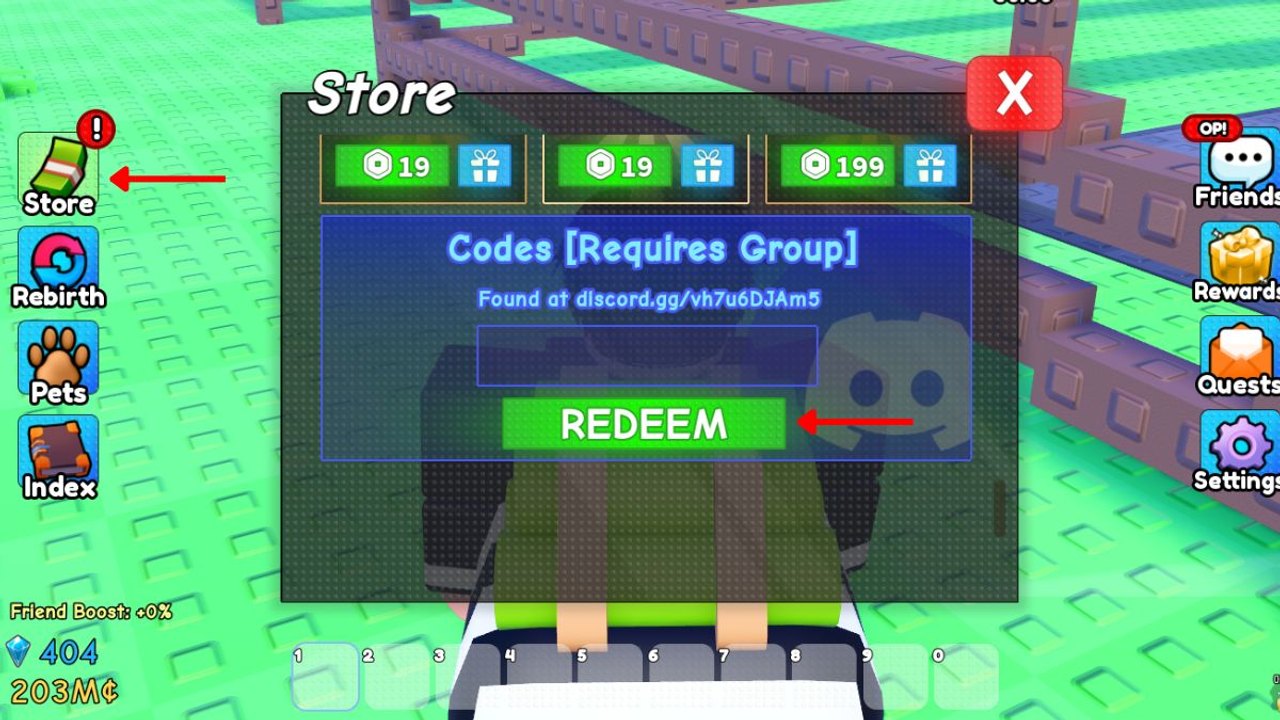
Redeeming Spin a Superhero codes is a four-click job once you know the HUD. The friction is not the text box — it is the group gate. The Store labels the panel Codes [Requires Group]. If you skip the Chill Games community, Redeem will eat your attempt or silently fail, and you will think the codes list is already dead.
This page is the exact click path for PC, mobile, and console, plus the errors that look like expired codes but are not.
Before you open Store
- Sign into Roblox on the same account you play Spin a Superhero with.
- Open the Chill Games community and join.
- Launch Spin a Superhero and wait until your plot HUD loads Coins and Gems in the corner.
- Copy codes from the Codes Hub rather than typing them. They are case-sensitive.
If you joined the group while already in a server, leave and rejoin. Membership often does not refresh until a new session.
PC and laptop
Look at the left stack. You should see Store (cash bundle), Rebirth, Pets, and Index. Friends, Rewards, Quests, and Settings sit on the right. Codes are not a top-level button.
- Click Store.
- Scroll past Dice and Gem offers until you reach Codes [Requires Group].
- Click the empty field. Paste one code.
- Click the green Redeem button.
- Wait for the reward toast. Then paste the next code.
Do not mash Redeem. The server needs a beat to credit Gems, Dice, or Coins. If you spam, you can think a valid code failed.
Mobile and tablet
The same sidebar exists, just tighter. Rotate to landscape if the Store clip-cuts the Codes field. Tap Store, drag the panel with your thumb, and long-press to paste. Roblox mobile sometimes inserts a trailing space from the clipboard — delete it. Then tap Redeem.
Console players use the on-screen keyboard. That is where typos happen. Prefer a phone clipboard share or type slowly. GROUP, LUCKY, and TRANSCENDENT are the ones people misspell.
What a success looks like
A working code grants one of four things:
- Coins (HEROES) for Dice purchases
- Gems (FLOOR3, TRANSCENDENT, RELEASE) for the Gem Shop
- Dice stacks (LUCKY, GROUP, TRADING, FUSE)
- A Prismatic Potion (LUCK2)
Open your currency counters after the toast. If Coins did not move, you either redeemed HEROES already or the server lagged — rejoin once before assuming expiry.
Failures that are not expiry
Requires Group. You are not in Chill Games, or the server has a stale membership flag. Join, rejoin the experience, retry.
Invalid / unknown. Typo, extra space, or a code from expired codes. EASTER, SUPERHERO, NETHER, CANDY, SEASON2, and MOREUPDATES already failed in September 2026.
Already redeemed. Codes are once per account, not per plot. Alts will not share the grant.
Nothing happens. Overlay ads or a half-loaded Store. Close Store, reopen, paste again. If the whole HUD is frozen, rejoin.
After you redeem
Spend in this order:
- Fill every empty pad — even a Common beats a hole. See how to play.
- Buy volume Dice, not the prettiest icon. The dice guide explains when Golden and Diamond are worth it.
- Save LUCK2 until you have a stack ready. Potions are wasted on a single Regular roll.
- Park Heaven and Devil Dice until Fuse or a high-Luck window. Read Fuse before you dump them.
If you just spawned, jump to Getting Started next. If you already have a full floor, compare keepers on the hero tier list.
Discord line on the Codes box
The official Store art prints discord.gg/vh7u6DJAm5 under the Codes heading. That invite is how Chill Games wants you to hear about the next string. Some write-ups also list discord.com/invite/hxvZ8Kyzbk. Follow the in-game text when they diverge, and still bookmark this wiki because Discord pins scroll away.
New codes often match patch names. FLOOR3 shipped with extra floors. FUSE and TRADING shipped with those systems. When the next shutdown title mentions a mechanic, check Store the same hour. We log those drops on the updates hub.
Redeeming on a busy plot
You do not need to stop income. Codes credit the account, not a pad. Redeem in the middle of a Dice session. Friend Boost in the corner does not change code payouts; it only multiplies plot income from party members on the same server (max 8 players).
If you share a device, confirm you are on the right Roblox account before you paste HEROES. There is no transfer.
For a printable spend order after codes, use the rebirth checklist. For safety around executors, stay on scripts and do not paste random loadstrings because a code failed.
Frequently Asked Questions
Quick answers for codes, dice, rebirths, and plot income.
Do I have to join a Roblox group to redeem?
Yes. The Store labels the field Codes [Requires Group]. Join Chill Games, rejoin Spin a Superhero, then paste from the codes list.
Where is the Codes button?
There is no dedicated Codes button. Open Store on the left, then scroll to the bottom of that panel.
Can I redeem the same code twice?
No. Each code is once per account. If it says already redeemed, skip to the next live string.
Codes still fail after I joined the group.
Leave the server and join a new one so membership refreshes. Then retry with a copied code and no trailing space.